SQL Server to Microsoft Fabric Migration

Vasu
Why Your Path to Microsoft Fabric Matters More Than the Deadline
Most organizations treat the SQL Server 2016 end-of-support deadline as a compliance problem. Patch the risk, move on. That instinct is going to cost some of them — not just in security exposure, but in the architecture they get locked into once the decision is made and the budget is spent. For many, the real opportunity isn’t a like-for-like upgrade, it’s a SQL Server to Microsoft Fabric migration that sets up a modern, AI-ready data architecture from the start.
SQL Server 2016 reaches the end of extended support on July 14, 2026. After that, regular security updates, bug fixes, and standard support stop. Microsoft does offer Extended Security Updates for organizations that need more time, but that is a paid, time-bound bridge, not a modernization plan. Lansweeper’s analysis of more than 500,000 SQL Server installations found that over 71% were already past their mainstream support end date. SQL Server 2014, which crossed extended end of support in 2024, still accounts for 17% of active deployments. Those are not legacy edge cases. That is a lot of production infrastructure carrying avoidable risk. And July is not far enough away for organizations that have not started yet to be comfortable.
The conversation around SQL Server to Microsoft Fabric migration at Build was not about clearing that deadline. It was about what you build when you do.
Why Migrate from SQL Server to Microsoft Fabric?
Most teams facing a hard deadline reach for the path of least resistance. Microsoft’s official options are broader than a simple Fabric-versus-lift-and-shift choice: migrate to Azure SQL, move as-is to SQL Server on Azure Virtual Machines, upgrade to SQL Server 2025, or purchase Extended Security Updates for more runway. Those are all valid paths.
But they lead to different destinations. For many teams, the practical move is to modernize on Azure SQL or Azure SQL Managed Instance, clear the compliance risk, and get back to work. Reasonable call. The spreadsheet supports it. What the spreadsheet does not show is everything that moves with you.
The siloed workspaces come along. So do the ETL scripts someone wrote over a weekend three years ago for a source system that has since been decommissioned. The Power BI gateways that were supposed to last six months and quietly became load-bearing infrastructure migrate too. And the two dashboards showing different revenue figures for the same quarter? Still two dashboards, just running on newer hardware.
Microsoft Fabric starts from a different premise. All workloads share one data store, OneLake, so analytics, engineering, governance, and BI are not separate systems passing data to one another. They work from the same source. That is useful for reporting. It becomes considerably more important given what Microsoft announced at Build.
| SQL-centered path (Azure SQL, Azure VM, SQL Server 2025, or ESUs) | Migrate to Microsoft Fabric | |
| End-of-support risk | Cleared through Azure SQL, Azure VM, or a current SQL Server upgrade; bridged by ESUs | Cleared |
| Data silos | Your existing workspace sprawl comes with you | Everything lands on OneLake — one store, shared across all workloads |
| ETL and pipelines | Existing scripts, gateways, and weekend fixes migrate intact | Rebuilt on Data Factory with governed, metadata-driven pipelines |
| Power BI reporting | Reports still refresh on a schedule; stale data issues don’t go away | Reports pull from the gold layer, so every team works from the same data |
| AI/ML readiness | Needs a separate infrastructure later | Spark Compute and Azure ML run on the same datasets as your operational reporting. |
| Time to value | Faster to execute or cheaper upfront, depending on the option | Longer upfront — but you’re not redoing this in three years |
What Build 2026 Changed About This Decision
Microsoft’s Build 2026 announcements make the direction hard to ignore: Fabric is the platform Microsoft is building its AI data story around, and the features shipping now reflect that. Several things announced there matter directly to organizations planning a SQL Server to Microsoft Fabric migration.
- Fabric IQ adds a semantic layer across the platform so AI agents, dashboards, and reporting tools all work from the same business definitions. That sounds like a technical detail. The practical consequence is significant. Without it, the same metric produces different answers depending on which system an agent queries, and that inconsistency is what erodes trust in AI outputs. It is also harder to fix after the fact than most teams expect going in.
The deeper issue is that AI querying raw database tables will always hit a ceiling. Raw tables carry data, not context. They do not know what your business means by revenue, how your fiscal year is structured, or which product lines roll up into which regions. Semantic models do.
- Agent Skills for Power BI, announced in preview, builds on exactly this. Analysts can use natural language or a screenshot to generate and refine semantic models, reports, and visuals — including cleaning up existing reports, not just creating new ones. The semantic layer is what makes those outputs reliable rather than just fast.
- Fabric Apps on Semantic Models takes it further. Teams can build custom web applications on Fabric as the backend, drawing from semantic models that already encode the business logic. Financial planning tools, inventory dashboards, staffing apps — without rewriting the rules each time someone needs a new surface.
- Fabric data agents are getting sharper, too. Natural language-to-SQL has improved, Python-based code interpreter support is now available, and source routing is more accurate. Microsoft cited roughly 20% accuracy gains from recent model upgrades in internal benchmarks.
The argument Microsoft was making at Build was not about individual features. It was about what the full stack looks like when data engineering, warehousing, semantic modeling, and conversational analytics all run on one platform. Raw data comes in at the bottom. Above that, the semantic model holds the business definitions — what your company actually means by revenue, by margin, by region. Fabric data agents sit on top of that, so when someone asks “show me this quarter’s margin by region,” the answer comes from the same logic the finance team uses, not a raw table that has no idea how your fiscal year is structured.
Most organizations treating this as a SQL Server to Microsoft Fabric migration are thinking about the bottom two layers. That clears the deadline. The conversational layer is what eventually changes how people actually work with data, and getting there depends on decisions made during the migration, not after it.
Microsoft Fabric: Architectural Differences
- Bronze is where data lands from source systems, exactly as received. No transformation. This is the ingestion layer and the system of record. If something breaks downstream, you reprocess from bronze without touching the source.
- Silver is the transformation layer. Python notebooks and SQL clean data, apply business rules, and reconcile differences across sources. SQL Server stored procedures get rebuilt as version-controlled code. This is usually the most time-consuming phase, not because the tools are difficult, but because business logic that has lived in stored procedures for years often turns out to be outdated, incorrect, or understood differently across teams. Plan for stakeholder reviews and make room for them in the timeline.
- Gold is the reporting layer: a pre-aggregated star schema optimized for Power BI. Because every report uses the same data foundation, it becomes structurally much harder for two dashboards to show different numbers.
Customer Story – SQL Server to Microsoft Fabric Migration
A construction and design-build firm came to WinWire with a fragmented data environment built up over the years — Oracle and SQL databases, on-premises systems, and Power BI workspaces that different teams had built and managed separately. The same metric often produced different results depending on which workspace it came from, and the analytics team already knew the numbers could not be fully trusted. Executives were making decisions on inconsistent reporting.
WinWire rebuilt the firm’s data foundation on Microsoft Fabric using WinAIDM, WinWire’s accelerator for the Fabric data lifecycle, which automates ingestion, data quality, transformation, and governance across all three medallion layers.
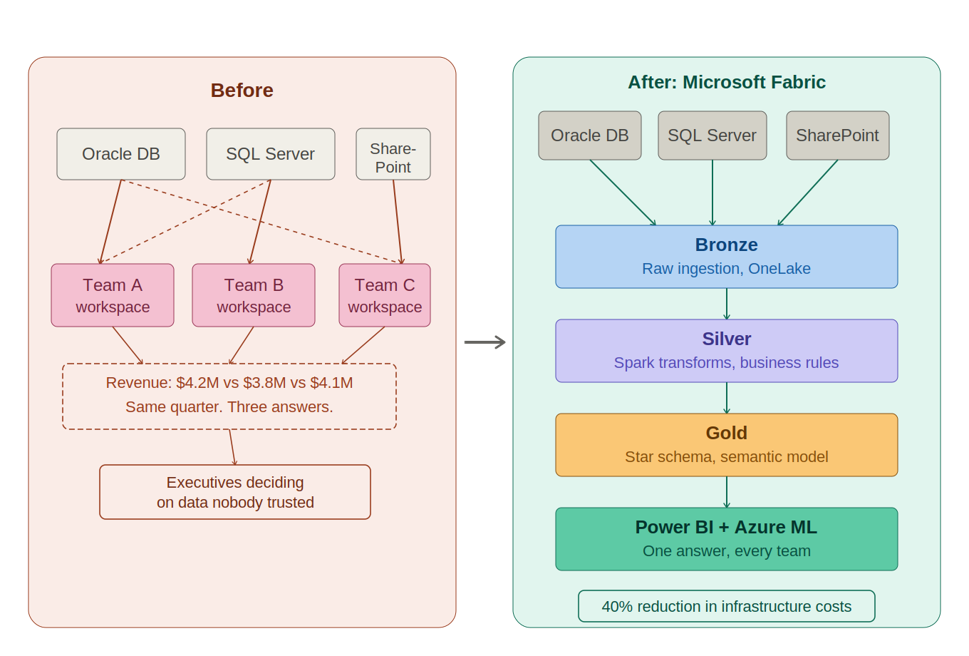
The pipelines alone took weeks to untangle. WinWire standardized Data Factory across Oracle, SQL Server, and SharePoint, using a single gateway configuration that is reused across all pipelines rather than rebuilt for each report. New data sources now get added through configuration tables rather than engineering tickets.
The silver layer runs Apache Spark for heavy transformations, and Azure ML sits on the same governed datasets as operational reporting, so the data science team no longer maintains a separate copy of everything the analytics team already has. The result was a 40% reduction in data infrastructure costs and a shared foundation for reporting, AI, and ML.
Best Practices for a Successful SQL Server to Fabric Migration
Decisions made early in a Fabric migration constrain what is possible later. Skipping the assessment phase is the most common reason projects hit expensive rework.
| Phase | What happens | Watch out for |
| Assessment & inventory | Full accounting of every data source, ETL job, stored procedure, report, and dependency. | Watch for jobs on undocumented schedules and reports tied to tables that no longer exist. |
| Architecture design | Finalize medallion layer design before any code moves — bronze sources, silver logic, gold schema. | Getting this wrong means rework. Decisions here constrain everything downstream. |
| Bronze ingestion | Source data lands in OneLake via Data Factory. On-premises SQL Server sources need a gateway. | Gateway configuration errors cause silent failures. Validate thoroughly before proceeding. |
| Silver transformation | Business logic re-implemented as Python or SQL in Fabric notebooks. The longest phase. | Stored procedure logic often turns out wrong or misunderstood. Plan for stakeholder review cycles. |
| Gold layer & Power BI | Star schema built. Power BI reports reconnected. Duplicate workspaces consolidated. | Report rationalization takes longer when ownership is unclear. Resolve before this phase begins. |
| Validation & cutover | Old and new systems run in parallel. Reports compared, discrepancies investigated. | Define success criteria before the parallel run begins, not during it. |
The Broader Point
Forrester Research found that more than one-quarter of surveyed global data and analytics employees who see poor data quality as a barrier estimate their organizations lose over $5 million annually because of it. The agentic AI capabilities Microsoft introduced at Build will only magnify what already exists in your data environment. Fragmented, inconsistent data produces fragmented, inconsistent AI outputs, just at a greater speed.
Fabric IQ, Agent Skills for Power BI, Fabric Apps on Semantic Models, and conversational analytics all need a governed, unified data layer. They work best when data is organized through a medallion architecture and semantic models reflect how the business actually defines key metrics.
The SQL Server 2016 deadline is forcing a decision that most organizations needed to make a while ago. Most will clear the compliance risk and move on. That is fine. But the organizations that use this window to rebuild the data foundation properly, not just migrate it, are the ones that will actually get value out of the agentic capabilities Microsoft is shipping right now. The ones that lift and shift will get there eventually. They will just pay twice to do it.
How WinWire Helps Enterprises Migrate to Microsoft Fabric
WinWire has completed this migration for organizations in construction, healthcare, financial services, and life sciences — using WinAIDM to shorten timelines without sacrificing rigor.
- Learn about WinAIDM
- Explore Microsoft Fabric services