MCP Powered Testing: Turning Requirements into Automated Test Suites

Atul

In modern Agile and DevOps environments, speed is everything. Yet, one bottleneck continues to slow teams down: “Converting business requirements into reliable, maintainable automation test suites.”
This step often demands heavy manual effort, causing delays and inconsistencies. As teams aim for quicker releases and better quality, connecting requirements to automation is increasingly challenging. Solving this is crucial for boosting efficiency and keeping testing aligned with fast-paced development.
Traditionally, every organization follows the workflow below –
User Story → Manual Test Cases → Automation Scripts → Execution → Reports
Each stage involves manual interpretation, rework, and communication gaps.
Today, with MCP (Model Context Protocol), AI-powered pipelines integrating:
- Azure DevOps
- GitHub Copilot
- Python automation frameworks
- Intelligent content processing
We can transform requirements directly into automation suites — reducing effort by 40 to 60% (if requirements are written in summary or details)
This blog demonstrates how to fully automate the workflow by leveraging modern MCP AI tools and integrations. It covers the transformation of business requirements into automated test suites with minimal manual effort via:-
- End-to-end system architecture
- AI-driven requirement parsing
- Azure DevOps integration
- Python libraries for test case generation
- Copilot-Assisted automation script creation
- Execution & reporting pipelines
This is a complete enterprise-grade blueprint designed to inspire confidence in QA, Dev, and DevOps teams that the solution is robust and scalable for their needs.
Challenge with Traditional Testing
| Stage | Stumbling block |
| Requirement Analysis | Ambiguous interpretation |
| Manual Test Creation | Time-consuming |
| Automation Conversion | Duplicate effort |
| Maintenance | High effort |
| Traceability | Weak linkage |
Even with solutions such as Azure DevOps Test Plans available, teams still perform several tasks manually. For example-
- Read description
- Interpret acceptance criteria
- Check comments
- Download attachments
- Write test cases
- Convert into automation scripts
This is repetitive and error-prone; this manual process not only consumes significant time but also increases the risk of mistakes and inconsistencies, making traceability and maintenance challenging.
MCP Powered Requirement to Automation Scripts
Leverage MCP, Python, and Copilot to automatically transform Azure DevOps User Stories, including their descriptions, acceptance criteria, comments, and attachments, into well-organized automation test suites, reducing manual effort and improving accuracy.
Comprehensive Solution Framework
Azure DevOps Integration for Fetching Azure DevOps Requirements
Using REST APIs from Azure DevOps – REST API Example
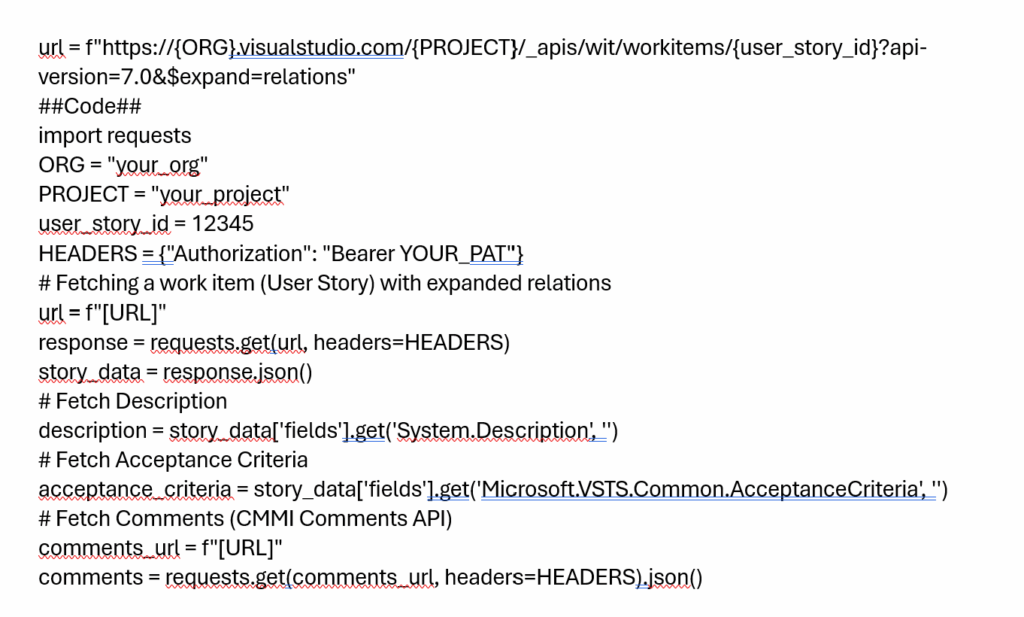
Fetch Description
- Field: System.Description
Fetch Comments
- CMMI Comments API
- Thread-based extraction
Fetch Attachments
- Relation type: attachedfile
- Download & parse:
- Excel
- Text
- CSV
Fetch Acceptance Criteria
- Field: Microsoft.VSTS.Common.AcceptanceCriteria
Python Processing Engine Libraries Used
- import requests
- import base64
- import json
- import openpyxl
- import re
- from html.parser import HTMLParser
HTML Cleaning Engine – For removing unwanted HTML from Description, Comments, and attachments. This engine utilizes Python libraries such as html.parser to effectively strip out unnecessary HTML tags and elements, ensuring that content remains clean, readable, and well-structured.
class HTMLStripper(HTMLParser):
def handle_data(self, d):
self.fed.append(d)
- Removes unwanted HTML
- Preserves content
- Keeps structure readable
Attachment Intelligence
Attachment Intelligence refers to the capability within the HTML Cleaning Engine to intelligently process file attachments associated with data records, such as documents or images. This feature goes beyond basic HTML stripping by:
- Detects binary vs text
- Extracts “Description” column from Excel
- Parses structured steps
Auto Conversion Requirements into Manual Test Cases
- Requirement Analysis: Carefully review each requirement to understand expected behaviors, inputs, outputs, and constraints.
- Test Case Identification: Break down requirements into individual test scenarios, considering both positive and negative cases.
- Precondition Validation: Specify any prerequisites or setup steps needed before executing the test case (e.g., user must be logged in).
- Test Steps Definition: Describe each step required to perform the test, ensuring clarity and reproducibility. Include wait strategies, boundary checks, and error handling steps where appropriate.
- Expected Results: Clearly define what outcome is expected at each step or at the conclusion of the test case.
- Attachment Intelligence: Ensure any associated documents, images, or data files are referenced and processed alongside the main test case for comprehensive coverage.
- Negative Scenario Testing: Include test cases that validate how the system behaves with invalid inputs or unexpected situations.
- Test Data Specification: Identify and document the test data required for each case, including variations for boundary and error conditions.
- Postcondition Verification: Validate the final state after test execution, confirming whether requirements have been met.
- Documentation: Organize test cases in a structured format (such as tables or spreadsheets) for easy review and automated analysis.
These are done by the method- AI enhancement layer:
def elaborate_test_step_with_ai(test_step):
Step-by-Step: Building an Automated Test Suite with MCP
Enhance test steps using an AI function (stubbed here for illustration; can be integrated with OpenAI or a custom LLM API).
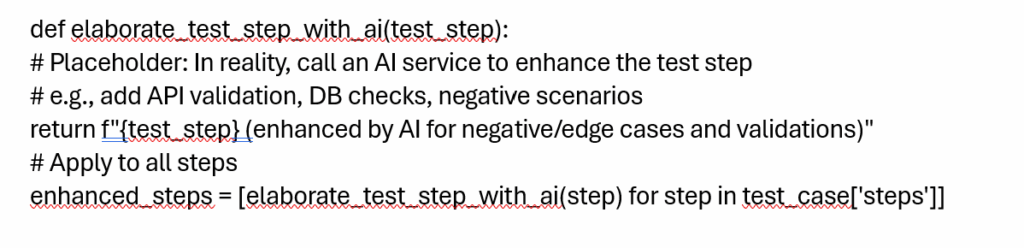
This will support:
- API testing enhancements
- Database validations
- SLA validation
- Negative scenarios
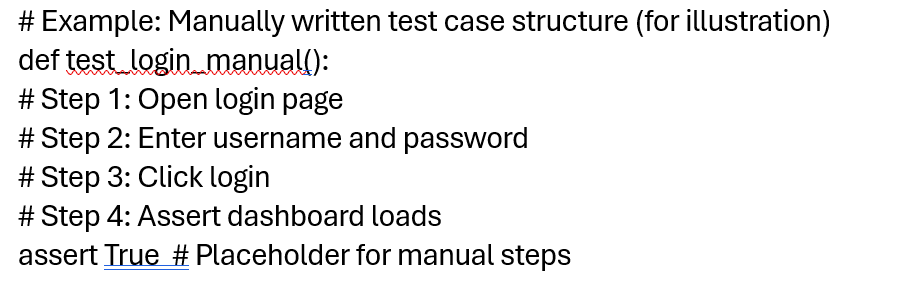
Generated Manual Test Case Structure
Output Options
- Excel Export (Formatted)
- Azure DevOps Test Case Work Items
- Test Suite Linking
- Parent Task Creation
The classic workflow typically involves:
Each stage is a potential source of delays and inconsistencies. Here’s how a manual test case might be created in Python:
Fetch Azure DevOps Test Plan Test Cases (Python Library)
Fetch Azure DevOps Test Plan Test Cases (Python Library) refers to retrieving test cases from a specified test plan and suite in Azure DevOps using Python.
Test Management API:
GET _apis/test/Plans/{planId}/Suites/{suiteId}/testcases
You can build:
def fetch_test_plan_testcases(plan_id, suite_id):
This enables:
- Regression suite updates
- Automation coverage mapping
- Gap analysis
GitHub Copilot – Convert Manual Test to Automation Script
Context-Driven Code Generation
If your framework contains:
- Page Object Models
- Custom Assertions
- Custom Wait Utilities
- Framework conventions
Copilot generates Auto scripts using below method:
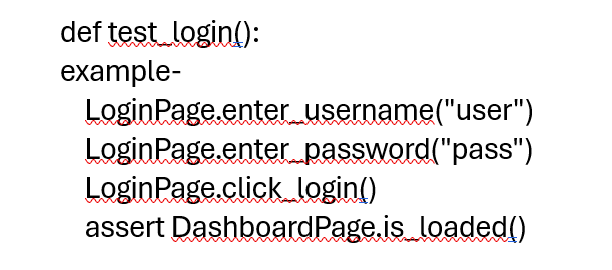
How this works:
- Manual test case is structured
- Framework context file defines:
o Imports
o Patterns
o Naming conventions - Copilot understands project scope
Result of Automation- 80% automation code auto-generated correctly.
Automation Execution Layer
The Automation Execution Layer efficiently runs automated tests across various environments. It supports local runners, CI/CD systems, and Azure Pipelines for versatile execution. Parallel testing with tools like Pytest-xdist speeds up execution and boosts productivity. Consistent execution in both development and production ensures reliable, scalable test automation.
Execution options:
- Local runner
- CI/CD pipeline
- Azure Pipeline
Reporting & Dashboards
The framework provides multiple reporting and dashboard options to visualize test results.
Reporting Options:
- HTML Reports
- Allure Reports
- Azure Test Results
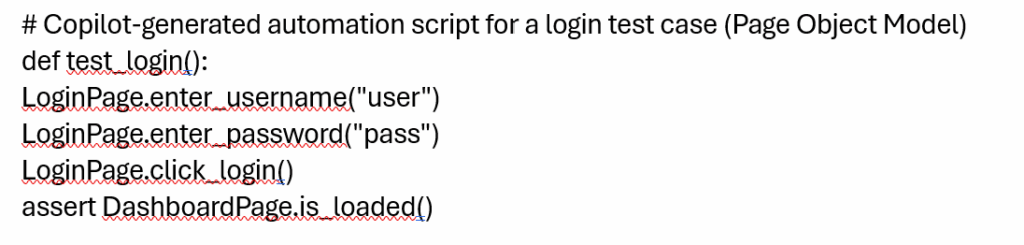
Copilot Automation: Copilot-Generated Automation Script
Use GitHub Copilot to auto-generate automation scripts from structured manual test cases, following your project’s conventions.
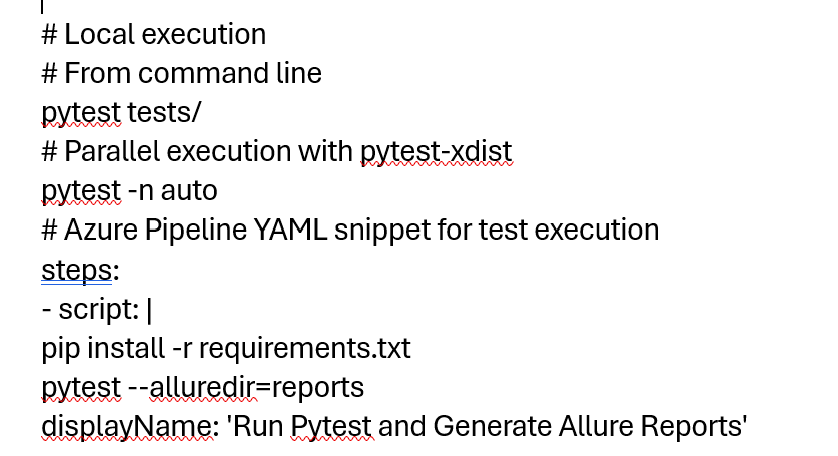
Automation Execution Layer: Running Tests Locally and in CI/CD
Run tests using Pytest locally or integrate with CI/CD pipelines (e.g., Azure Pipelines).
Reporting & Dashboards: Generating HTML/Allure Reports
Generate and visualize test results for stakeholders.
# Generate Allure reports after test run
pytest –alluredir=reports
To serve the Allure report locally allure serve reports
Test trend charts, pass/fail graphs, and execution time analytics are available in Allure’s dashboard.
Enterprise Benefits
| Feature | Benefit |
| AI Requirement Parsing | Eliminates interpretation gaps |
| Auto Test Case Generation | Saves 50% effort |
| Copilot Automation | Saves 70% scripting time |
| CI/CD Integration | Faster releases |
Advanced Enhancements
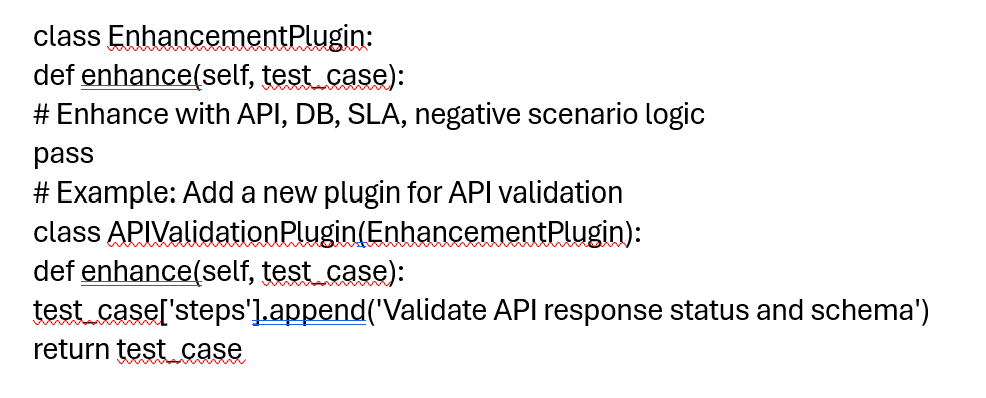
Plugin Architecture
class EnhancementPlugin:
Supports:
- API testing enhancements
- Database validations
- SLA validation
- Negative scenarios
Extend your framework with plugins for API testing, DB validations, SLA checks, and negative scenarios.
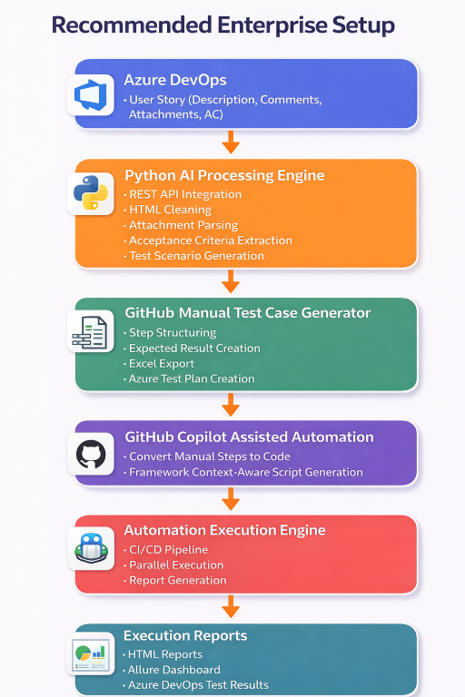
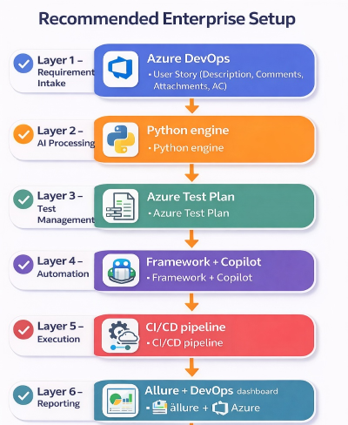
Recommended Enterprise Setup
Real-World Impact
- 60% Reduction in Manual Effort
- 40% Faster Regression Cycles
- Improved Defect Detection Early
- Better QA-Dev Collaboration
Conclusion
MCP Powered Testing is no longer optional — it’s inevitable.
Adopting next-generation MCP AI-powered testing isn’t just a choice; it’s becoming an essential part of modern software development. In summary, organizations that embrace AI-driven testing benefit from reduced manual effort, faster regression cycles, earlier defect detection, and stronger collaboration between QA and development teams, positioning themselves for greater efficiency and product quality.
By combining:
- Azure DevOps APIs
- Python AI processing engine
- Manual test generation
- GitHub Copilot automation
- CI/CD execution
- Smart reporting