API and Web Application Security Testing: A Complete Guide for Enterprise Security

Atul

In today’s digital landscape, API and web application security testing has never been more critical. API-driven and cloud-integrated applications reign supreme, powering everything from mobile apps and fintech innovations to e-commerce giants and dynamic microservices. Each exposed API and web interface becomes a lucrative target for cyber adversaries, creating high-stakes attack surfaces. A single exploited vulnerability can trigger catastrophic data breaches, compromising millions of records and inflicting multimillion-dollar losses on organizations. Establishing a rigorous, continuous API and web application security testing program is no longer optional — it is the foundation of a resilient enterprise security posture.
What Is API and Web Application Security Testing — And Why Does It Matter?
API and web app security testing detects vulnerabilities before attackers exploit them. It safeguards sensitive data and ensures compliance. Effective testing also helps maintain customer trust and prevents costly disruptions.
Most breaches today originate from
- Misconfigured APIs
- Broken authentication
- Insecure integrations
- Cloud misconfigurations
Real-World API & Web App Breaches (Impact and Loss)
- Global average cost of a data breach approx. $4.88 million (as of 2024)
- 70% of breached organizations reported major operational disruption.
- Mega-breaches involving millions of records.
- Fortune 500 Organization impacted- Facebook, T-Mobile, Twitter, LinkedIn etc.
API and Web Security Testing Phases
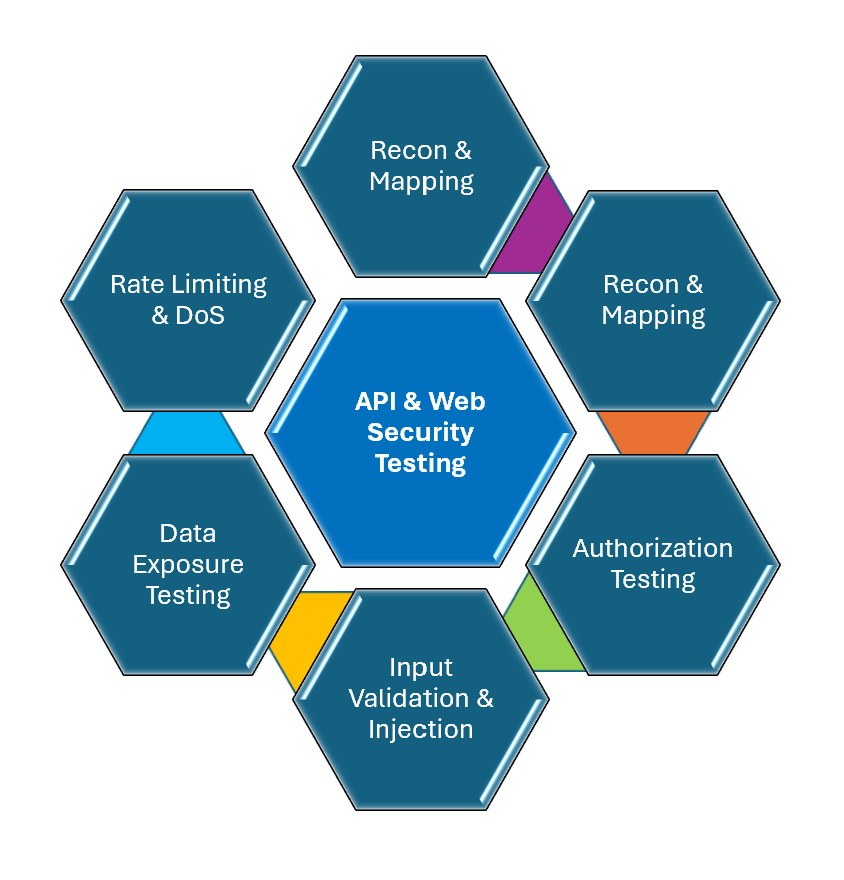
Phases of API and Web Application Security Testing
Phase 1: Recon & Mapping
Recon & Mapping means understanding an application/system by exploring it and mapping all its components, flows, and dependencies before designing tests or automation.
- Identify endpoints
- Collect request/response schemas
- Map authentication flows
- Identify third-party integrations
Phase 2: Authentication Testing
Authentication testing verifies that an application correctly identifies and allows access only to valid users or systems. It ensures login mechanisms, tokens, sessions, and identity controls work securely.
Test Scenarios– Expired token reuse, Missing MFA and Token tampering.
What to test
- Login form validation and Password rules
- Session handling and Remember-me tokens
- Logout functionality
- Multi-factor authentication (MFA)
- Account lockout after failed attempts
Phase 3: Authorization Testing
Authorization testing verifies that a user can access only the data and actions they are permitted to, after authentication.
What to test
- Role-Based Access Control (RBAC)
- Object-Level Authorization (BOLA/IDOR)
- Function-Level Authorization
- Horizontal vs Vertical Privilege Escalation
- Token/Session Enforcement and Multi-tenant Isolation
Sample Test Matrix
| Scenario | Expected Result |
| User token → admin API | 403 Forbidden |
| Access other user’s order | 403/404 |
| Expired token | 401 Unauthorized |
| Wrong tenant ID | 403 |
| UI hidden button + API call | API must block |
Phase 4: Input Validation & Injection
Input Validation –Input validation means checking that all user-provided data is correct, safe, and expected before processing it
Types of Input Validation
Client-side and Server-side validation.
Common Input Validation Rules like -Type check (string, number, Boolean), Length , Format Allowed characters, Range, Whitelisting and Reject unexpected input.
Injection Attacks – Injection attack happens when malicious input is interpreted as code or commands by the system. Instead of treating input as data as system executes it. This is one of the top OWASP vulnerabilities.
Types of Injection
SQL Injection- Attacker injects SQL into input fields:
Examples-
- ‘ OR 1=1 —
- SELECT * FROM users WHERE username = ‘input’
- SELECT * FROM users WHERE username = ” OR 1=1 –
Command Injection- Input executed as OS command.
Example-; rm -rf /
Note- Dangerous if system executes shell commands.
API Injection- Occurs in query params, JSON body and headers.
Example- GET /users?id=1 OR 1=1
XSS (Cross-site scripting)-Injects JavaScript into webpage.
Example- <script>alert(‘hacked’)</script>
NoSQL Injection- Targets MongoDB to bypass login- i.e. { “username”: { “$ne”: null } }
Example Test verifications:-
- Empty values, special characters, too long input and wrong format
Phase 5: Data Exposure Testing
Data Exposure Testing is the process of verifying that an application does not expose sensitive data unintentionally through APIs, web responses, logs, URLs, or client-side code.
Data Exposure Testing in APIs
APIs are the most common place for data leaks.
What testers check
- Excessive data exposure-API returns more data than needed.
- Authorization issues –Check if another user’s data is accessible.
- Token exposure-Check if tokens appear in URL, response, logs and local storage.
- Error message exposure –API errors should not be exposed in stack traces, SQL queries, server paths.
- Unencrypted data –Check if sensitive data sent over HTTP instead of HTTPS and Plain text.
- Debug endpoints –Check if these are exposed to /admin, /debug, /internal
Data Exposure Testing in Web Apps
Data Exposure Testing ensures sensitive information such as tokens, personal data, and internal details are not unintentionally exposed through UI, logs, or network responses.
This includes:-
- Review page source and browser storage for hidden fields, comments, tokens, API keys, and ensure sensitive data is encrypted and not exposed.
- Use network tools to verify that responses do not reveal PII, internal IDs, or authentication tokens.
- Test access controls by logging in with different roles (user, admin, guest) to confirm users only see data appropriate to their permissions.
Test Cases Scenarios
API data exposure test
- Verify response does not return hidden fields
- Verify unauthorized user cannot fetch data
- Verify sensitive fields masked
Web data exposure test
- Inspect network calls (Burp/ZAP)
- Check local storage (JWTs, user data, API keys)
- Check cookies (HttpOnly and Secure)
- Check logs
Phase 6: Rate Limiting & DoS
Rate Limiting & DoS are security and performance validation techniques used to ensure an application cannot be abused by excessive traffic or malicious requests.
Rate Limiting:- Rate limiting restricts how many requests a user/client can send to an API or server within a time window.
Example:-100 requests per minute per user, 5 login attempts per minute, 1000 API calls per hour per token
Rate Limiting Test Scenarios
Functional checklist
- Send requests within limit → should pass
- Exceed limit → should get 429 response
- Check reset after time window
- Check per user vs. per IP vs per token
Security checklist
- Bypass using multiple tokens
- Bypass via IP rotation
- Check distributed requests
- Check header manipulation
DoS (Denial of Service) Testing
DoS testing checks if a system can handle very high traffic or malicious traffic attempts without crashing. The goal is to ensure system remains stable under heavy load or attack.
Types
Basic DoS-Single source flooding server.
DDoS (Distributed)-Multiple sources attacking simultaneously.
Application-level DoS –Target specific endpoints like- login, search, file upload and API endpoints.
DoS Testing Scenarios
- Flood API with requests
- Large payload attacks
- Slow requests (slowloris)
- Concurrent login attempts
- Large file uploads
- Repeated search queries
Phase 7: Business Logic Testing
Business Logic Testing focuses on validating whether the core rules of the application (how it is supposed to behave) can be abused, bypassed, or manipulated by a user or attacker.
Business Logic Testing in APIs
APIs are the biggest target because, they expose backend logic, easy to manipulate requests and automation-friendly for attackers.
Common API Business Logic Vulnerabilities:-
- Price Manipulation
- Quantity Manipulation
- Workflow Bypass
- Role/Privilege Abuse
- Coupon Abuse
- Rate Limit Bypass
Business Logic Testing in Web Apps
Business logic testing ensures application workflows and rules cannot be abused or bypassed through APIs or user interfaces. It targets vulnerabilities like price manipulation, workflow skipping, and unauthorized role escalation.
Common Web Business Logic Issues
Skipping Steps, Negative Values, Multiple Discount Abuse, ID Tampering and Broken Approval Flows.
Phase 8: Security Misconfiguration
Security Misconfiguration is when an application, API, server, or cloud service is incorrectly configured, exposing it to attackers. It’s one of the OWASP Top 10 vulnerabilities.This will ensure that the system work, but is set up in an insecure way.
Common issues
- Default credentials still active and Debug mode enabled in production
- Directory listing enabled and Server version exposed
- Improper headers (CSP, HSTS missing) and Open admin endpoints
- Unused ports/services enabled
How to Perform Security Misconfiguration Testing
Step-by-step (Web)
- Check headers (Burp/ZAP)
- Scan for open directories
- Try default creds
- Check error messages
- Inspect response headers
- Look for debug pages
Top 5 API Security Testing Tools
| Tool | Type |
| OWASP ZAP | Open-source |
| Postman + Security Tests | API testing |
| Burp Suite | Commercial /Community |
| StackHawk | DevSecOps |
| 42Crunch | API-focused |
Top 5 Web Application Security Testing Tools
| Tool | Type |
| Burp Suite | Commercial/ Community |
| OWASP ZAP | Open-source |
| Netsparker (Invicti) | Commercial |
| Acunetix | Commercial |
| Nikto | Open-source |
Conclusion
API and web application security testing is no longer optional. Most breaches occur due to simple issues like:
- Broken auth
- Misconfigurations
- Poor validation
With billions lost each year and real-world incidents affecting millions, organizations need to continuously test security during development, QA, and production. Vulnerabilities can cause data breaches, financial loss, regulatory fines, and long-term damage to reputation.