AI UX Design for Enterprise Applications: A Practical Framework

Thomas
Stop adding AI. Start reshaping the experience.
For thirty years, enterprise software has run on one bargain. The user learns the system and does the work by hand, task after task, screen after screen. AI breaks that bargain. When software can read what you want, write its own answer, act for you, and get sharper the more you use it, you’re not looking at the old application with a new feature added on top. You’re looking at a different kind of product.
That gap is where most enterprises get AI wrong. They ask how to add AI to the application they already have, then ship a summary button here, a smarter search box there. All useful. None of it moves much. The better question is what AI should change about the way people actually experience the business, and that’s the real work of AI UX design. It starts with what the user is trying to get done, well before anyone lays out a screen.
What actually changes: from navigation to intent
Traditional enterprise systems are organized around modules and menus, and the fixed workflows that tie them together. A lot of a user’s effort goes into learning where things live and which workflow to run for a given task. AI collapses that. You state a goal, and the system takes on the parts you used to handle yourself: working out what you meant, finding the right workflow, pulling the data, handing back a result.
Take a manager approving a travel claim. Today that’s a slog. Open the expense module, hunt down the claim, check it against policy, confirm the receipts, click through the approval chain. A dozen steps across two or three screens. With AI, the manager just says: approve John’s travel claim. The system reads it, checks it against policy, flags the one receipt that’s missing, and either approves it or explains why it can’t. The interface didn’t get redesigned so much as it got out of the way.
Analysis goes the same way. Instead of opening four dashboards and stitching together why the numbers moved, the user asks Show me why sales dropped this quarter, and the answer comes back already assembled.
Designing for this is a different discipline. The old question was where to put a button. The new ones are about behavior. How does the system figure out what the user actually wants? When should it act on its own, and when should it stop and ask first? Then there’s memory, what it holds onto between sessions, and recovery, how it finds its way back when it gets something wrong. These are the questions that decide whether a product works now. Layout barely comes into it.
Three ways people will work with intelligent software
Those behaviors show up as three interaction models. They work together more than they compete, and most enterprise products will end up using all three.
- Conversational interaction lets people work through language, voice, or some mix of the two. Dialogue takes over from navigation, so the user holds less of the system’s structure in their head. The travel-claim request earlier is a conversational one.
- Agentic interaction is where the system carries out the task itself. It coordinates the steps and runs the process through to the end, while the user keeps oversight through approvals and a clear record of what happened and who’s answerable for it. The line gets crossed the moment the system actually completes the approval instead of just describing how.
- Generative interaction lets the product build what the user needs right then and there. Instead of one fixed screen built for everyone, it assembles a view around this person’s role and the exact question they just asked. That sales explanation from earlier wasn’t sitting in a pre-built report. The product put it together on the spot.
Put these together, and you get software that bends to the user, rather than the other way around.
The real problem is trust
All of it comes back to one question, and it’s the one that decides whether any of the rest gets used. Can the user trust what the system does for them?
This is where AI UX design is won or lost. A summary button carries no real risk. Get it wrong and the user shrugs and moves on. A system that approves the claim, moves the money, or sits an executive down to explain why revenue fell is making decisions that count, and adoption rides entirely on whether people believe those decisions. Technical metrics don’t settle it. A model can be accurate, fast, and heavily automated and still not be trusted, and a system nobody trusts doesn’t get used, however capable it is underneath.
Trust comes from behavior the user can watch. The system shows its reasoning and how sure it is. On the decisions that call for a check, it asks first; on the ones where it’s earned some room, it goes ahead on its own. It remembers what you prefer without being creepy about it, and when you override it, it takes the correction and doesn’t quietly slide back tomorrow. None of this can be added after the fact. Trust is built into how the intelligence behaves from its first decision, or it isn’t there at all. And when it isn’t, the product fails, whatever else it can do.
WinWire’s AI UX Design Framework
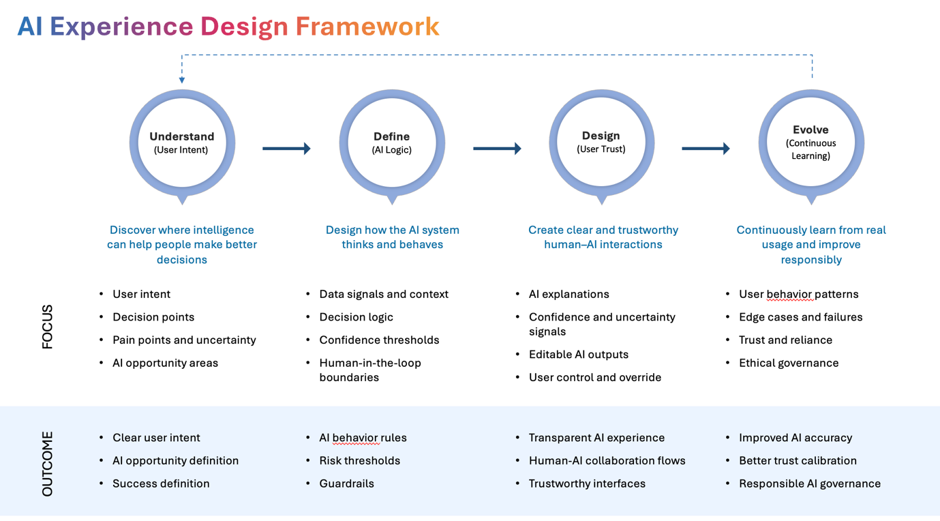
Good intentions don’t get you a trustworthy product. You need a method you can run more than once. Our AI UX Deisgn Framework is that method, laid out in four stages, and each one takes on a problem from earlier in this piece.
The first stage, Intent & Outcome Framing, deals with the move from navigation to intent. Before anyone sketches a screen, the team gets clear on what users are actually trying to do, where AI genuinely helps and where it just adds noise, what business result counts as success, and what limits responsible use has to hold.
Intelligence & Behavior Design is the behavioral work, and it’s the heart of the whole thing. This is where you decide how the system reasons, when it acts and when it holds back for a human, how much it does with the user versus for them, and where a person’s judgment stays in the loop no matter what.
Then Interaction & Trust Design takes the trust question head-on. The behaviors from the section above, showing its reasoning, signaling confidence, asking before it acts, taking correction, staying consistent, don’t happen by accident. This stage makes each of them a deliberate design choice instead of something bolted on once the thing already works.
The last stage, Learning, Governance & Evolution, is about staying trustworthy after launch. Any system that learns from use will drift, and drift is quiet, so this stage watches trust and performance over time, tightens governance where it’s slipping, and gives the product a way to get better instead of slowly getting worse.
Run all four, and AI UX design stops being a pile of one-off decisions and becomes something an enterprise can actually repeat.
Where we land on this
AI UX design isn’t really about making software easier to use. It’s about making the intelligence itself something people can actually use, and trust, and get value from. Treat AI as a feature, and you’ll make a few tasks faster. Treat it as a real product capability, and you change the whole thing: how the work gets done and whether anyone believes the system enough to let it do that work in the first place.
The next wave of enterprise applications won’t win by listing the most AI features. They’ll win on something harder to fake. Whether the intelligence understands the people using it, works with them instead of around them, and earns enough trust to actually act. That’s the whole point of AI UX design, and it’s what our framework is built to get you to.
If you’re already asking the better question- how AI should reshape the way your people work rather than which feature to add next- that’s the conversation we want to have. WinWire helps enterprise teams design AI experiences people trust and use.
Let’s talk about what that looks like for your business.