SQL Server 2016 to Azure SQL Migration – Tools, Steps & Best Practices

Vasu
Why Migrate from SQL Server 2016 to Azure SQL?
SQL Server 2016 exits extended support on July 14, 2026, and after that date, organizations will need Extended Security Updates or a migration plan to stay protected. That’s the part most teams know. What they’re slower to say out loud is that the database still running payroll, claims processing, or customer records doesn’t quietly become safer just because the calendar moved on. It just becomes a liability nobody officially owns.
Deadlines have a way of doing what internal roadmaps never quite manage. They get finance off the fence.
What matters in 2026 isn’t just getting to Azure. Target selection and cost structure have consequences that outlast the deadline, and the calendar won’t wait for the organization to figure them out.
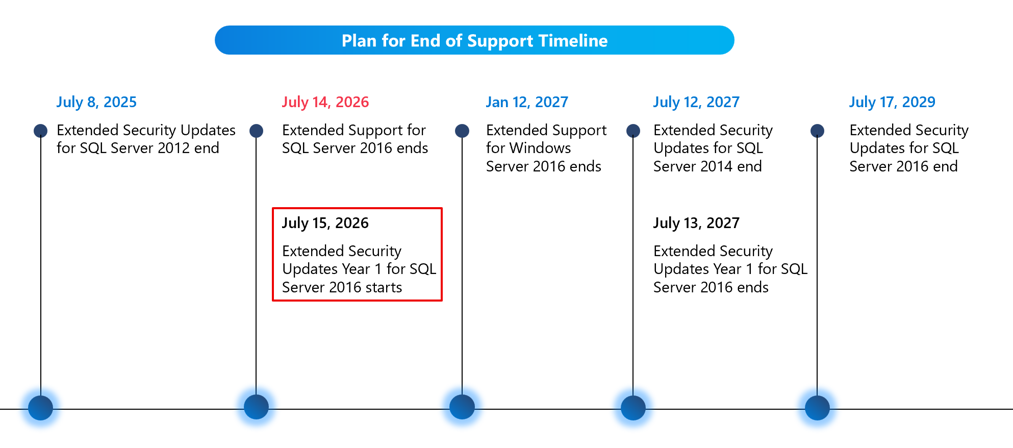
KEY DATE: July 14, 2026: SQL Server 2016 exits extended support. Organizations still running 2016 or earlier face real security and compliance exposure.
Three ways to respond before July 14
Not every organization will take the same path. The right answer depends on the workload, timeline, risk profile, and the extent of change the business can absorb. Broadly, there are three practical options.
- Modernizing on Azure PaaS is the most complete response. Microsoft manages patching, backups, and availability, so the database platform stays current without long refresh cycles. For organizations that can take on some refactoring, this path usually creates the strongest long-term case.
- Upgrading to SQL Server 2025, in Azure or on-premises, is a valid option for teams that cannot move to cloud PaaS right away. SQL Server 2025 brings native vector capabilities and built-in support for semantic search, which matters for organizations building AI-ready data platforms. It also moves workloads off the end-of-support clock without forcing a rushed migration.
- Extended Security Updates are a bridge. They help organizations maintain protection and meet compliance requirements as they plan their next move. But they add cost and do not solve the underlying modernization issue. That cost should be visible early, before ESUs enter a holding pattern rather than a planned transition.
What’s Making Teams Move Now
End-of-support pressure is one driver. Not the only one, and for many IT leaders, not even the primary one. Organizations are moving because datacenter contracts are expiring, IT teams are stretched thin, the CAPEX model no longer makes financial sense, and the gap between their data infrastructure and what AI actually requires is becoming harder to explain up the chain. The deadline often secures the budget. What’s actually driving the decision has been building for longer than that.
The Economics
An IDC study commissioned by Microsoft reported up to 406% three-year ROI and a 30% TCO reduction over five years for organizations that migrated SQL workloads to Azure SQL Database and Managed Instance. These are vendor-funded figures, so treat them as directional.
The underlying logic holds: every year a workload sits on hardware you own, you’re paying for unused capacity, patching cycles, refresh planning, and DBA time that could go elsewhere.
Why Azure SQL?
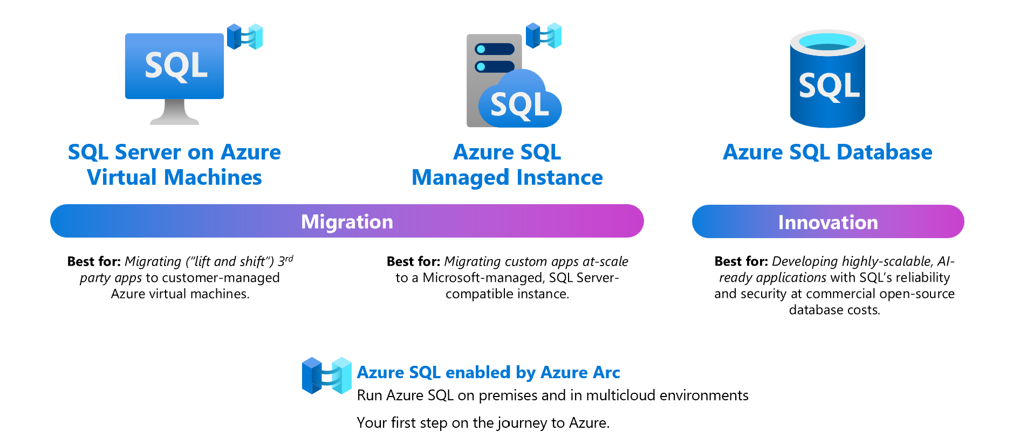
Azure SQL is a family of fully-managed, secure and intelligent SQL database services. Azure offers the widest range of deployment options for SQL. With Azure SQL, you can rehost SQL workloads on SQL Server on Azure Virtual Machines, modernize existing applications with Azure SQL Managed Instance and support modern cloud applications with Azure SQL Database.
Azure SQL is built upon the same SQL Server engine, so you can migrate applications with ease and continue to use the tools, languages and resources you’re familiar with. Your skills and experience transfer to the cloud, so you can do even more with what you already have.
The services within Azure SQL support a variety of scenarios:
- SQL Server on Azure Virtual Machines: Lift-and-shift your SQL workloads with ease and maintain with 100% SQL Server compatibility and operating system-level access
- Azure SQL Managed Instance: Modernize your existing SQL Server applications at scale with an intelligent fully managed service
- Azure SQL Database: Support modern cloud applications on an intelligent, managed service that includes serverless compute
SQL Server on Azure VMs and SQL Managed Instance are also now Azure Arc enabled, allowing you to run these services on the infrastructure of your choice, when a hybrid approach is required.
Azure SQL Database now supports native vector storage and similarity search, which means it can handle AI workloads directly without routing data through a separate vector database. For RAG-based applications that need a dedicated search infrastructure, Microsoft Foundry IQ handles vector and semantic search at scale. The infrastructure is ready. Whether the data inside it is ready is a different question.
Most organizations planning AI work in 2026 are bumping into the same wall: the data they need is discoverable in the sense that it exists somewhere, but not in the sense that an AI system can actually find, trust, and use it. There’s a difference. Business definitions aren’t documented. Data lineage is thin or missing entirely. Sensitive records are only loosely governed. The SQL Server migration is the right moment to answer those questions honestly, because once the data moves to Azure, the expectation is that it’s ready, and readiness takes more than a new endpoint.
AI-Infused Data Management (WinAIDM)
WinWire’s AI-Infused Data Management (WinAIDM) offering is built for exactly this gap. Before any pipeline is built, an AI readiness assessment covers the five areas that tend to pose the most risk: whether business data is discoverable, whether data quality is sufficient for AI to trust, whether sensitive records are adequately protected, whether business definitions are actually documented, and whether data lineage is available. These aren’t audit checkboxes. They’re the questions that decide whether the AI work planned for next year actually ships.
WinAIDM AI Readiness Assessment : Before any pipeline is built, WinWire runs a structured assessment across five areas that determine whether migrated data is actually usable for AI work.
| Assessment Area | The Real Question |
| AI Readiness | Is your business data discoverable by AI systems, or just technically stored somewhere? |
| Data Quality | Is the data clean and consistent enough for AI to trust, or will it silently produce bad outputs? |
| Security | Are sensitive records identified, classified, and protected before they move to the cloud? |
| Metadata | Are business definitions documented, or does each team carry its own version of the truth? |
| Governance | Is data lineage available, so you can trace where data came from and how it changed? |
These aren’t audit questions. They’re the five things that decide whether the AI work on your roadmap actually ships on time.
SQL Server 2016 vs Azure SQL Database — Key Differences
| Feature | SQL Server 2016 | Azure SQL Database |
| Deployment model | On-premises or IaaS VM. You manage OS, hardware, patching, HA, and backups. | Fully managed PaaS. Microsoft handles OS, patching, backups, HA, and failover automatically. |
| High availability & SLA | Manual Always On AG or FCI setup required. SLA depends on your infrastructure — no built-in guarantee. | 99.99% SLA built-in. Automatic failover, zone-redundant replicas (Business Critical tier), and geo-replication available out of the box. |
| Scalability | Vertical scaling only — requires downtime to add CPU/RAM. Storage expansion needs manual DBA work. | Scale compute and storage independently with near-zero downtime. Serverless tier auto-pauses when idle, saving cost. |
| Security & compliance | TDE, row-level security, Always Encrypted available. Manual patching — you’re responsible for CVE remediation timelines. | Same features plus Microsoft Defender for SQL, Advanced Threat Protection, automatic threat detection, Ledger tables, and continuous compliance certifications (ISO, SOC, HIPAA, FedRAMP). |
| Support lifecycle | After July 2026, no security patches without purchasing Extended Security Updates (ESUs) — paid add-on. | Continuously updated by Microsoft. Always on a supported version. No EOL risk. |
SQL Server 2016 to Azure SQL Migration Options — Which Path Is Right for You?
A lot of migration projects stumble early because someone says, “We’re moving to Azure SQL,” without specifying which Azure SQL they mean.
There are three real choices, and they aren’t interchangeable.
| Service | Best For | Key Features | When to Choose |
| Azure SQL Database | Modern apps, SaaS, single or logical DB groups | Fully managed. Microsoft handles patching, HA, and backups. | No SQL Agent or cross-DB dependencies; the team can absorb some refactoring |
| Azure SQL Managed Instance | Legacy apps where rewriting is not realistic | Near-complete SQL Server compatibility: SQL Agent, CLR, cross-DB queries | Instance-level features required; months of refactoring not acceptable |
| SQL Server on Azure VMs | Lift-and-shift; lowest-risk first step | OS-level control, full file system access, and existing SQL Server setup preserved | FileStream/FileTable, third-party host agents, or specific compliance configs |
ASSESSMENT NOTE: Two hours reviewing real workload telemetry will outperform a generic scoring model almost every time. Some teams assume they need a Managed Instance, only to discover that SQL Database is sufficient after a thorough dependency review. Others assume SQL Database will work fine, then find forgotten SQL Agent jobs or cross-database joins three weeks into the project. That’s an assessment problem, not a tooling problem.
SQL Server 2016 to Azure SQL Migration – Rationalize Your Migration Path
An estate of 30 databases will rarely have the same answer for every workload. That’s exactly why rationalization work matters before anyone opens a migration tool.
| Path | Approach | Payoff | Choose When |
| Rehost / Re-platform | Minimal changes; preserve existing SQL config | Fastest to cloud; Hybrid Benefit and Reserved Instances reduce costs quickly | Getting off aging hardware is the primary goal. |
| Refactor / Rearchitect | Redesign for cloud-native patterns | Better performance, scalability, and real technical debt reduction | Long-term platform investment; time and effort are available |
| Retain (Hybrid) | Keep on-prem with Azure connectivity | No forced cutover; meets compliance or contract constraints | Partial migration is the honest answer for now |
| Replace | Swap the aging app for a SaaS alternative | Eliminates migration risk entirely | A SaaS product fits better than migrating the application |
Step-by-Step: How to Migrate SQL Server 2016 to Azure SQL
- Assessment : Assessment comes first, and it’s worth taking seriously. Azure Migrate builds a business case from actual resource usage data, not estimates. SQL Server Migration Assistant catches schema and compatibility issues before they become cutover problems. Teams that skip either tend to find surprises at the worst possible moment. Finding unsupported T-SQL patterns during a live migration window is a bad place to learn that lesson.
- Planning: Planning is where the migration stops being conceptual. Workload readiness gets assessed, SKUs get right-sized, and the plan moves from a slide to an actual schedule. For most databases under a terabyte, a planned maintenance window works. Larger estates or high-availability workloads need more engineering time and honest conversations about how much disruption is actually acceptable.
- Execution: Choose the migration tool that matches your downtime tolerance and estate size.
SQL Server 2016 to Azure SQL Migration Tools
| Tool | Use Case | Notes |
| Azure Database Migration Service | Default starting point | Supports offline (maintenance window) and online (minimal downtime) migration |
| Azure Migrate | Build a business case from actual usage data | Run during assessment; surfaces real cost and sizing data |
| SQL Server Migration Assistant | Schema and compatibility checking | Catch T-SQL issues before they become cutover problems |
| Transactional Replication | Production cannot pause during migration | Azure SQL Database acts as a subscriber while data syncs continuously |
| Log-based CDC (e.g., Striim) | Large estates, low-disruption migration | Streams transactions in near real time; best for 30 or more databases |
What Teams Consistently Underestimate
This is where projects slip. Not because Azure failed, but because the basics got rushed.
- Log Generation Limits: Azure SQL Database caps log generation at 96 MB/s of sustained throughput. If migration pushes harder than that, the target throttles and the cutover window stretches. The fix is simple and frequently missed: scale up during migration, then scale back down after. Business Critical Gen5 8 vCore delivers the maximum log rate. Hyperscale sits at 100 MB/s regardless of service level, which is why many large migrations land there.
- Network Bandwidth: If the VPN or ExpressRoute connection can’t sustain the required throughput, the migration runs at the speed of its weakest link. Obvious in principle, and still missed often enough to be worth saying explicitly.
- Post-Migration Validation: Validation needs real owners, not a shared checklist. Update statistics with a full scan—re-point connections across all applications and reporting tools. Ad-hoc scripts get missed more often than anyone expects. Compare row counts. Check query plans. Test under realistic load before users return. Most teams know this. Many still treat validation like a closeout task, and that’s where the post-go-live tickets begin.
- Cutover Is Not Just an IT Event: The cutover date shouldn’t be set without application owners and business stakeholders in the room. Support teams need to know what’s changing and when. A technically clean cutover can still fail if customer service learns Saturday morning that their lookup tool is offline.
- Compliance Region Gaps: Not every Azure feature is available in every region. For organizations in finance, healthcare, or government, this matters early. The compliance requirement that locks you to a specific geography might also limit which service tiers or capabilities are available to you. Check regional feature availability before you finalize the target, not after.
- Network Architecture: Most teams start with a public endpoint during testing because it’s faster to configure. Many keep it. For production SQL migrations, Azure Private Link is the right default: it keeps database traffic entirely off the public internet and simplifies the path to a zero-trust posture. The switch from public to private endpoint isn’t technically difficult, but it touches firewall rules, application connection strings, and DNS. Do it early, not as a go-live cleanup task.
Cost Levers Worth Using
The cost conversation usually starts after go-live. It should start earlier, and a few decisions need to happen before migration begins.
- Scale up for migration, then scale back down. The tier you need for the migration window is rarely the tier you need after go-live. Too many teams keep paying for migration-window capacity long after the work is done.
- Azure Hybrid Benefit is one of the most underused options available. Existing SQL Server licenses with Software Assurance transfer to Azure SQL Database, Managed Instance, or SQL Server on Azure VM. When combined with reserved capacity, the difference in compute costs between reserved and pay-as-you-go is significant.
- Dev/Test pricing for non-production environments gets overlooked consistently. UAT and staging databases shouldn’t quietly inflate the cloud bill because no one applied the right pricing model.
SQL Server 2016 to Azure SQL Migration – Customer Story
One construction software company was running nearly 900 SQL Server databases across five data centers, serving 8,000+ global customers on a colocation setup that was failing to scale. Every time a customer needed more computing power, new hardware got added, and the cost got passed on.
WinWire used a factory-model migration approach to move 650TB of data across 1,800 virtual machines to Azure with near-zero downtime. Post-migration hosting costs dropped 30%, and uptime reached 99.99%. The infrastructure stopped being the reason they couldn’t grow. Read the full case study
What a Successful Migration Program Looks Like
The programs that go well share one pattern: the hard decisions get made before the migration starts, not during it.
Target selection happens before anyone opens a migration tool. Assessment runs on real workload telemetry. Business owners are in the room before the cutover date gets announced. Validation is owned by named individuals, not a shared checklist that everyone assumes someone else is watching. None of it is advanced practice. These are the basics, and migration programs that stumble usually skip at least one.
July 2026 will move organizations that haven’t moved on their own. Microsoft’s tooling is solid, and the path is well-documented. What’s harder is the internal work: the dependency mapping that takes real assessment time, and the stakeholder conversations that determine whether the cutover window actually holds.
How WinWire Can Help
SQL Server migration touches more than the database team. It affects application performance, compliance posture, cost structure, and whatever AI work the business is planning for next year.
That’s where WinWire comes in. We assess your SQL Server estate, map the dependencies that tend to surface at the worst possible moment, and help your team choose the right target based on real workload data. Not assumptions, not generic scoring models.
We also run an AI readiness assessment as part of the engagement, using WinAIDM, WinWire’s AI-infused data management accelerator built for Microsoft Fabric. It covers the five dimensions that determine whether migrated data is actually usable for AI: discoverability, data quality, security posture, metadata completeness, and lineage.
Once the assessment is done, WinAIDM automates ingestion, data quality, and governance across the Bronze-Silver-Gold Fabric Lakehouse zones, cutting the time to trusted, Copilot-ready data by up to 70%. Both technical and business teams get a no-code interface to build rules, monitor pipelines, and catch quality issues before they reach production. The result is fewer surprises at cutover and a data layer that’s actually ready for the AI roadmap, not just technically migrated.
July 14, 2026, is closer than most teams’ roadmaps suggest.
Get Started
If your organization is still running SQL Server 2016, the assessment is the right place to start. It takes less time than you’d expect and surfaces more than you think it will.
Start your SQL Server assessment. It will show what needs to move, what can wait, and where the real risk sits. Contact Us